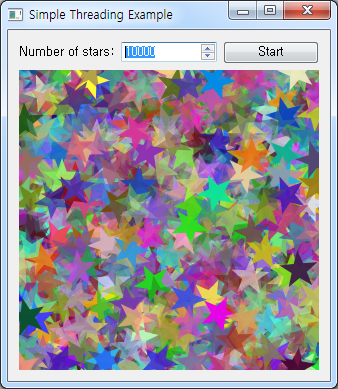
예제 소스코드
import sys
import math
import random
import sip

API_NAMES = ["QDate", "QDateTime", "QString","QTextStream", "QTime", "QUrl", "QVariant"]
API_VERSION = 2
for name in API_NAMES:
   sip.setapi(name, API_VERSION)

from PyQt4.QtCore import *
from PyQt4.QtGui import *

class Window(QWidget):

    def __init__(self, parent=None):

        QWidget.__init__(self, parent)

        self.thread = Worker()

        label = QLabel("Number of stars:")
        self.spinBox = QSpinBox()
        self.spinBox.setMaximum(10000)
        self.spinBox.setValue(100)
        self.startButton = QPushButton("&Start")
        self.viewer = QLabel()
        self.viewer.setFixedSize(300, 300)

        self.connect(self.thread, SIGNAL("finished()"), self.updateUi)
        self.connect(self.thread, SIGNAL("terminated()"), self.updateUi)
        self.connect(self.thread, SIGNAL("output(QRect, QImage)"), self.addImage)
        self.connect(self.startButton, SIGNAL("clicked()"), self.makePicture)

        layout = QGridLayout()
        layout.addWidget(label, 0, 0)
        layout.addWidget(self.spinBox, 0, 1)
        layout.addWidget(self.startButton, 0, 2)
        layout.addWidget(self.viewer, 1, 0, 1, 3)
        self.setLayout(layout)

        self.setWindowTitle("Simple Threading Example")

    def makePicture(self):

        self.spinBox.setReadOnly(True)
        self.startButton.setEnabled(False)
        pixmap = QPixmap(self.viewer.size())
        pixmap.fill(Qt.black)
        self.viewer.setPixmap(pixmap)
        self.thread.render(self.viewer.size(), self.spinBox.value())

    def addImage(self, rect, image):

        pixmap = self.viewer.pixmap()
        painter = QPainter()
        painter.begin(pixmap)
        painter.drawImage(rect, image)
        painter.end()
        self.viewer.update(rect)

    def updateUi(self):

        self.spinBox.setReadOnly(False)
        self.startButton.setEnabled(True)

class Worker(QThread):

    def __init__(self, parent=None):

        QThread.__init__(self, parent)
        self.exiting = False
        self.size = QSize(0, 0)
        self.stars = 0

        self.path = QPainterPath()
        angle = 2*math.pi/5
        self.outerRadius = 20
        self.innerRadius = 8
        self.path.moveTo(self.outerRadius, 0)
        for step in range(1, 6):
            self.path.lineTo(
                self.innerRadius * math.cos((step - 0.5) * angle),
                self.innerRadius * math.sin((step - 0.5) * angle)
                )
            self.path.lineTo(
                self.outerRadius * math.cos(step * angle),
                self.outerRadius * math.sin(step * angle)
                )
        self.path.closeSubpath()

    def __del__(self):

        self.exiting = True
        self.wait()

    def render(self, size, stars):

        self.size = size
        self.stars = stars
        self.start()

    def run(self):

        # Note: This is never called directly. It is called by Qt once the
        # thread environment has been set up.

        random.seed()
        n = self.stars
        width = self.size.width()
        height = self.size.height()

        while not self.exiting and n > 0:

            image = QImage(self.outerRadius * 2, self.outerRadius * 2,
                           QImage.Format_ARGB32)
            image.fill(qRgba(0, 0, 0, 0))

            x = random.randrange(0, width)
            y = random.randrange(0, height)
            angle = random.randrange(0, 360)
            red = random.randrange(0, 256)
            green = random.randrange(0, 256)
            blue = random.randrange(0, 256)
            alpha = random.randrange(0, 256)

            painter = QPainter()
            painter.begin(image)
            painter.setRenderHint(QPainter.Antialiasing)
            painter.setPen(Qt.NoPen)
            painter.setBrush(QColor(red, green, blue, alpha))
            painter.translate(self.outerRadius, self.outerRadius)
            painter.rotate(angle)
            painter.drawPath(self.path)
            painter.end()

            self.emit(SIGNAL("output(QRect, QImage)"),
                      QRect(x - self.outerRadius, y - self.outerRadius,
                            self.outerRadius * 2, self.outerRadius * 2), image)
            n -= 1

if __name__ == "__main__":

    app = QApplication(sys.argv)
    window = Window()
    window.show()
    app.exec_()