예제 소스코드
#!/usr/bin/env python


#############################################################################
##
## Copyright (C) 2010 Riverbank Computing Limited.
## Copyright (C) 2010 Nokia Corporation and/or its subsidiary(-ies).
## All rights reserved.
##
## This file is part of the examples of PyQt.
##
## $QT_BEGIN_LICENSE:BSD$
## You may use this file under the terms of the BSD license as follows:
##
## "Redistribution and use in source and binary forms, with or without
## modification, are permitted provided that the following conditions are
## met:
##   * Redistributions of source code must retain the above copyright
##     notice, this list of conditions and the following disclaimer.
##   * Redistributions in binary form must reproduce the above copyright
##     notice, this list of conditions and the following disclaimer in
##     the documentation and/or other materials provided with the
##     distribution.
##   * Neither the name of Nokia Corporation and its Subsidiary(-ies) nor
##     the names of its contributors may be used to endorse or promote
##     products derived from this software without specific prior written
##     permission.
##
## THIS SOFTWARE IS PROVIDED BY THE COPYRIGHT HOLDERS AND CONTRIBUTORS
## "AS IS" AND ANY EXPRESS OR IMPLIED WARRANTIES, INCLUDING, BUT NOT
## LIMITED TO, THE IMPLIED WARRANTIES OF MERCHANTABILITY AND FITNESS FOR
## A PARTICULAR PURPOSE ARE DISCLAIMED. IN NO EVENT SHALL THE COPYRIGHT
## OWNER OR CONTRIBUTORS BE LIABLE FOR ANY DIRECT, INDIRECT, INCIDENTAL,
## SPECIAL, EXEMPLARY, OR CONSEQUENTIAL DAMAGES (INCLUDING, BUT NOT
## LIMITED TO, PROCUREMENT OF SUBSTITUTE GOODS OR SERVICES; LOSS OF USE,
## DATA, OR PROFITS; OR BUSINESS INTERRUPTION) HOWEVER CAUSED AND ON ANY
## THEORY OF LIABILITY, WHETHER IN CONTRACT, STRICT LIABILITY, OR TORT
## (INCLUDING NEGLIGENCE OR OTHERWISE) ARISING IN ANY WAY OUT OF THE USE
## OF THIS SOFTWARE, EVEN IF ADVISED OF THE POSSIBILITY OF SUCH DAMAGE."
## $QT_END_LICENSE$
##
#############################################################################


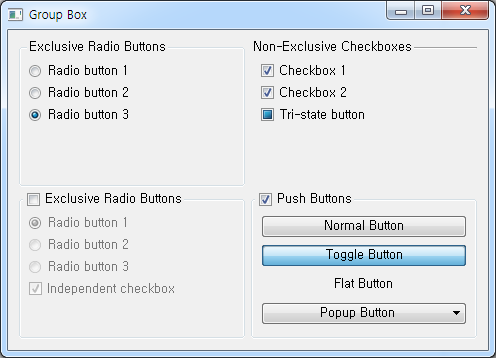
from PyQt4 import QtCore, QtGui


class Window(QtGui.QWidget):
    def __init__(self, parent=None):
        super(Window, self).__init__(parent)

        grid = QtGui.QGridLayout()
        grid.addWidget(self.createFirstExclusiveGroup(), 0, 0)
        grid.addWidget(self.createSecondExclusiveGroup(), 1, 0)
        grid.addWidget(self.createNonExclusiveGroup(), 0, 1)
        grid.addWidget(self.createPushButtonGroup(), 1, 1)
        self.setLayout(grid)

        self.setWindowTitle("Group Box")
        self.resize(480, 320)

    def createFirstExclusiveGroup(self):
        groupBox = QtGui.QGroupBox("Exclusive Radio Buttons")

        radio1 = QtGui.QRadioButton("&Radio button 1")
        radio2 = QtGui.QRadioButton("R&adio button 2")
        radio3 = QtGui.QRadioButton("Ra&dio button 3")

        radio1.setChecked(True)

        vbox = QtGui.QVBoxLayout()
        vbox.addWidget(radio1)
        vbox.addWidget(radio2)
        vbox.addWidget(radio3)
        vbox.addStretch(1)
        groupBox.setLayout(vbox)

        return groupBox

    def createSecondExclusiveGroup(self):
        groupBox = QtGui.QGroupBox("E&xclusive Radio Buttons")
        groupBox.setCheckable(True)
        groupBox.setChecked(False)

        radio1 = QtGui.QRadioButton("Rad&io button 1")
        radio2 = QtGui.QRadioButton("Radi&o button 2")
        radio3 = QtGui.QRadioButton("Radio &button 3")
        radio1.setChecked(True)
        checkBox = QtGui.QCheckBox("Ind&ependent checkbox")
        checkBox.setChecked(True)

        vbox = QtGui.QVBoxLayout()
        vbox.addWidget(radio1)
        vbox.addWidget(radio2)
        vbox.addWidget(radio3)
        vbox.addWidget(checkBox)
        vbox.addStretch(1)
        groupBox.setLayout(vbox)

        return groupBox

    def createNonExclusiveGroup(self):
        groupBox = QtGui.QGroupBox("Non-Exclusive Checkboxes")
        groupBox.setFlat(True)

        checkBox1 = QtGui.QCheckBox("&Checkbox 1")
        checkBox2 = QtGui.QCheckBox("C&heckbox 2")
        checkBox2.setChecked(True)
        tristateBox = QtGui.QCheckBox("Tri-&state button")
        tristateBox.setTristate(True)
        tristateBox.setCheckState(QtCore.Qt.PartiallyChecked)

        vbox = QtGui.QVBoxLayout()
        vbox.addWidget(checkBox1)
        vbox.addWidget(checkBox2)
        vbox.addWidget(tristateBox)
        vbox.addStretch(1)
        groupBox.setLayout(vbox)

        return groupBox

    def createPushButtonGroup(self):
        groupBox = QtGui.QGroupBox("&Push Buttons")
        groupBox.setCheckable(True)
        groupBox.setChecked(True)

        pushButton = QtGui.QPushButton("&Normal Button")
        toggleButton = QtGui.QPushButton("&Toggle Button")
        toggleButton.setCheckable(True)
        toggleButton.setChecked(True)
        flatButton = QtGui.QPushButton("&Flat Button")
        flatButton.setFlat(True)

        popupButton = QtGui.QPushButton("Pop&up Button")
        menu = QtGui.QMenu(self)
        menu.addAction("&First Item")
        menu.addAction("&Second Item")
        menu.addAction("&Third Item")
        menu.addAction("F&ourth Item")
        popupButton.setMenu(menu)

        newAction = menu.addAction("Submenu")
        subMenu = QtGui.QMenu("Popup Submenu", self)
        subMenu.addAction("Item 1")
        subMenu.addAction("Item 2")
        subMenu.addAction("Item 3")
        newAction.setMenu(subMenu)

        vbox = QtGui.QVBoxLayout()
        vbox.addWidget(pushButton)
        vbox.addWidget(toggleButton)
        vbox.addWidget(flatButton)
        vbox.addWidget(popupButton)
        vbox.addStretch(1)
        groupBox.setLayout(vbox)

        return groupBox


if __name__ == '__main__':

    import sys

    app = QtGui.QApplication(sys.argv)
    clock = Window()
    clock.show()
    sys.exit(app.exec_())
| 번호 | 제목 | 글쓴이 | 날짜 | 조회 수 |
|---|---|---|---|---|
| 4 | 다른 디렉터리의 파일(모듈) import 하기 | pjk | 2014.08.22 | 8147 |
| 3 |
[PyQt4]윈도우창에 별 찍기 예제
 | pjk | 2014.08.19 | 11676 |
| 2 |
Python으로 작성된 프로그램을 윈도우응용프로그램(exe)으로 빌드하기
| pjk | 2014.08.03 | 17138 |
| 1 | 파이썬으로 작성된 소스를 py2exe을 이용하여 윈도우 응용프로그램 빌드시 콘솔창 숨기기 | pjk | 2014.07.29 | 18028 |