올해 초에 Qt Project의 보안팀은 QProcess를 사용하여 전체 경로 없이 다른 응용 프로그램을 시작할 때 발생할 수 있는 보안관련 패치를 제공했었다.
여기서는 이 문제를 재현해보고 QProcess의 올바른 사용법을 알아본다. 아직 패치하지 않았거나 하기 어려운 개발자는 검토해 보시길.
테스트 환경:
Windows 11
MinGW 64-bit
Qt 5.15.2
이 문제는 PATH 환경 변수에서 목적의 실행 파일을 찾기 전에 먼저 해당 앱의 디렉토리를 검색하기 때문에 발생한다. 어떤 나쁜 마음을 먹은 공격자가 같은 이름의 악성 실행 파일을 앱과 같은 위치에 배치하고 정보를 가로 챌 수 있다.
다음과 같이 사용하는 경우가 문제의 원인이다.
QProcess p;
p.start("application", args);
예를 들어 애플리케이션이 시스템에 설치된 압축해제 프로그램을 사용하려고 한다. (bandizip 을 미리 설치해 두었다.)
#include <QCoreApplication>
#include <QProcess>

int main(int argc, char *argv[])
{
    QCoreApplication a(argc, argv);

    QStringList args;
    args.append("x"); // Unzip
    args.append("-p:Passw0rd"); // Password
    args.append("-o:" + a.applicationDirPath() + "/dest"); // Target folder
    args.append(a.applicationDirPath() + "/sample.zip"); // Archive

    QProcess p;
    p.start("bandizip", args);
    p.waitForFinished(-1);
}
압축파일의 경로 및 패스워드등이 전달된다. 압축파일이 문제없이 잘 풀린다.
하지만 이 문제를 노리고 데이터를 가로채는 프로그램을 앱과 같은 위치에 배치했다고 치자.
가짜 bandizip 구현
#include <QCoreApplication>
#include <QFile>
#include <QString>
#include <QDebug>
#include <QTextStream>

void write(const QString &filename, const QStringList &args)
{
    QFile file(filename);
    // Trying to open in WriteOnly and Text mode
    if(!file.open(QFile::WriteOnly |
                  QFile::Text))
    {
        qDebug() << " Could not open file for writing";
        return;
    }

    // To write text, we use operator<<(),
    // which is overloaded to take
    // a QTextStream on the left
    // and data types (including QString) on the right

    QTextStream out(&file);

    for(const auto &arg : args) {
        out << arg << "\n";
    }

    file.flush();
    file.close();
}

int main(int argc, char *argv[])
{
    QCoreApplication a(argc, argv);

    write("stealArgs.txt", a.arguments());

    return 0;
}
이 프로그램은 명령줄 옵션을 전달받고 파일에 쓰는 일을 한다.
이제 예제 앱을 실행하면 사용자가 기대하지 않은일이 벌어질 수 있다. 다음 이미지는 stealArgs.txt 파일의 내용이다.
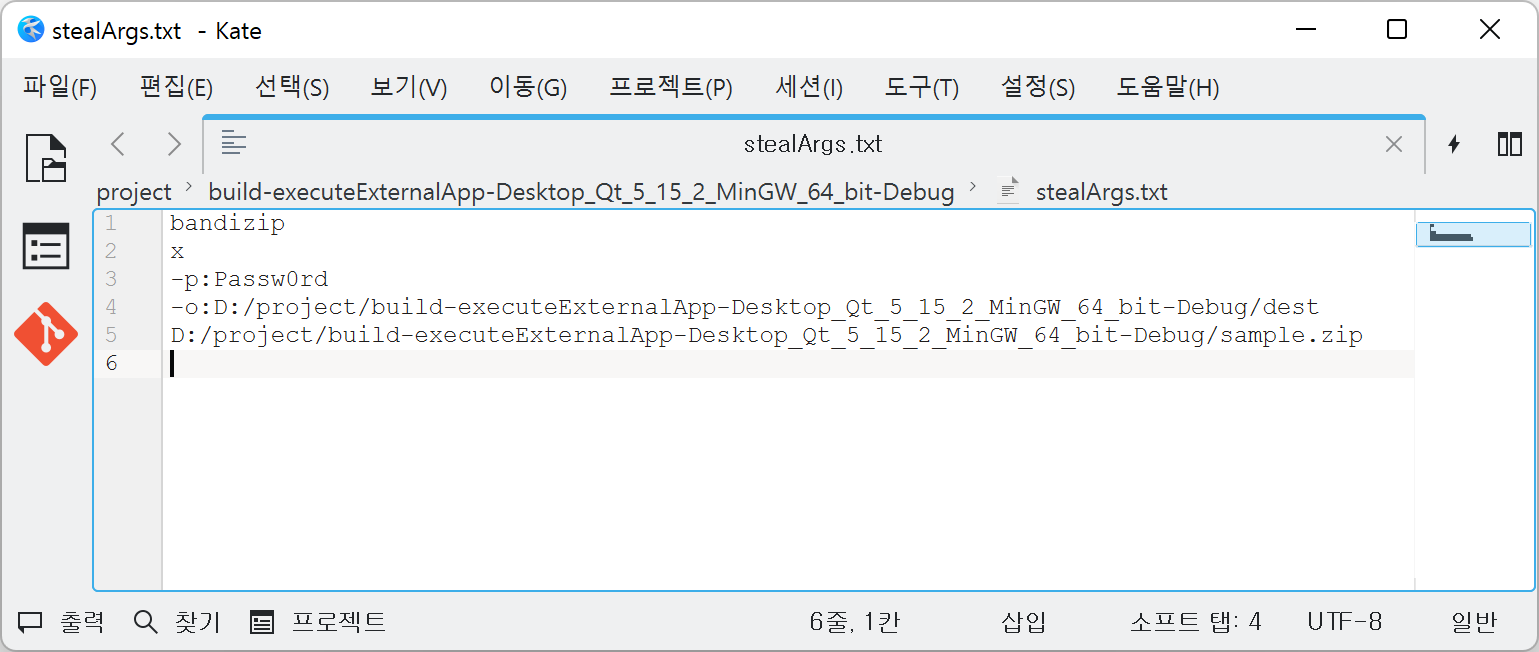
패치하거나 최신버전을 사용하면 좋겠지만 당장어렵다면 애플리케이션의 전체 경로를 확인하여 이런 위험을 줄일 수 있다. 이 목적에 부합하는 QStandardPaths::findExecutable 를 사용하면 PATH 환경 변수를 검색하고 결과적으로 안전한 사용 경로를 제공받을 수 있다.
예제 코드는 다음과 같다.
#include <QCoreApplication>
#include <QProcess>
#include <QDebug>

#include <QStandardPaths>

int main(int argc, char *argv[])
{
    QCoreApplication a(argc, argv);

    auto bandizipPath = QStandardPaths::findExecutable("bandizip");

    if( !bandizipPath.isEmpty() ){
        QStringList args;
        args.append("x"); // Unzip
        args.append("-p:Passw0rd"); // Password
        args.append("-o:" + a.applicationDirPath() + "/dest"); // Target folder
        args.append(a.applicationDirPath() + "/sample.zip"); // Archive

        QProcess p;
        p.start(bandizipPath, args);
        p.waitForFinished(-1);

        qDebug() << "finished";
    } else {
        qDebug() << "not found command.";
    }
}