QML and Qt Quick
2023.03.15 17:47

QML에서 D-Bus 통신

조회 수 7227 추천 수 0 댓글 0
?

단축키

Prev이전 문서

Next다음 문서

크게 작게 위로 아래로 댓글로 가기 인쇄 첨부
?

단축키

Prev이전 문서

Next다음 문서

크게 작게 위로 아래로 댓글로 가기 인쇄 첨부

Nemo Mobile D-Bus QML 플러그인을 사용하면 시스템 및 세션 버스의 서비스에 액세스하고 자체 서비스를 제공할 수 있다. D-Bus는 프로세스 간 통신에 사용된다.


저장소: https://github.com/sailfishos/nemo-qml-plugin-dbus


QML Types

이 모듈에는 다음 QML 유형이 제공된다.

  • DBusAdaptor : DBusAdaptor 개체는 시스템 또는 세션 버스에서 D-Bus 서비스를 제공하는 데 사용할 수 있다. 서비스가 활성화되어 있는 한 시스템의 다른 응용 프로그램에서 이 서비스를 호출할 수 있다. QML의 DBusAdaptor는 D-Bus를 통해 간단한 객체를 노출하는 수단을 제공하기 위한 것이다. 보다 복잡한 사용 사례의 경우 C++ 및 Qt DBus 모듈을 사용하는 것이 좋다.
  • DBusInterface : DBusInterface 개체는 시스템 및 세션 버스에 있는 개체의 메서드를 호출하고 신호(signalsEnabled 참조)를 수신하고 해당 개체의 속성을 읽는 데 사용할 수 있다.

Examples

세션 버스 개체에서 함수 호출

import QtQuick 2.0
import Nemo.DBus 2.0

Item {
    DBusInterface {
        id: profiled

        service: 'com.nokia.profiled'
        iface: 'com.nokia.profiled'
        path: '/com/nokia/profiled'
    }

    Component.onCompleted: {
        // Call the "set_profile" method here
        profiled.call('set_profile', ['silent']);
    }
}


함수 호출 및 반환 값 얻기

import QtQuick 2.0
import Nemo.DBus 2.0

Item {
    DBusInterface {
        id: profiled

        service: 'com.nokia.profiled'
        iface: 'com.nokia.profiled'
        path: '/com/nokia/profiled'
    }

    Component.onCompleted: {
        // Call the "get_profile" method without arguments, and
        // when it returns, call the passed-in callback method
        profiled.typedCall('get_profile', [], function (result) {
            // This will be called when the result is available
            console.log('Got profile: ' + result);
        });
    }
}


D-Bus 객체의 시그널 수신

import QtQuick 2.0
import Nemo.DBus 2.0

Item {
    DBusInterface {
        id: profiled

        service: 'com.nokia.profiled'
        iface: 'com.nokia.profiled'
        path: '/com/nokia/profiled'

        signalsEnabled: true

        function profile_changed(changed, active, profile, values) {
            if (changed && active)
                console.log("Profile changed to:", profile)
        }
    }
}


ConnMan 의 D-Bus 제어 인터페이스를 통해 네트워크 연결 상태 감지


ConnMan은 Linux 를 실행하는 임베디드 장치에 중점을 둔 인터넷 연결 관리자다. 인터넷 연결을 관리하기 위한 연결 관리 데몬(connmand)이 있고 이 데몬은 D-Bus 제어 인터페이스를 제공한다. 따라서 응용프로그램은 D-Bus를 사용하여 ConnMan 서비스를 이용할 수 있다.


다음은 DBusInterface 개체를 통해 QML에서 간단하게 connmand 과 연결하고 인터넷 연결 상태가 바뀔 때마다 UI에 표시하는 방법을 보여준다.

import QtQuick 2.15
import QtQuick.Window 2.15
import Nemo.DBus 2.0

Window {
    width: 640
    height: 480
    visible: true
    title: qsTr("Network State")

    DBusInterface {
        id: connmanManager

        // Connman on the D-Bus system bus
        bus: DBus.SystemBus

        service: 'net.connman'
        iface: 'net.connman.Manager'
        path: '/'

        signalsEnabled: true

        // Will be called when the "PropertyChanged" signal is received.
        function propertyChanged(p, v) {
            console.log("Property Changed:", p, v)
            if ( p === 'State' ) {
                state.text = v
            }
        }
    }

    Column {
        anchors.centerIn: parent
        Text {
            id: stateLabel
            text: "네트워크 상태"
            font.pixelSize: 28
            horizontalAlignment: Text.AlignHCenter
        }
        Text {
            id: state
            width: parent.width

            font.pixelSize: 22
            horizontalAlignment: Text.AlignHCenter
        }
    }
}
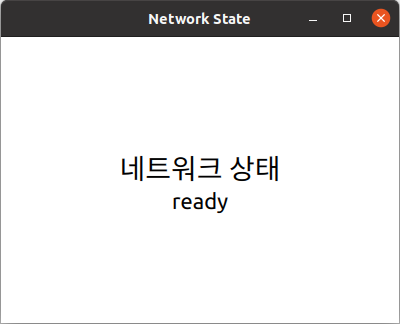
 

ConnMan_State.png

TAG •

  1. No Image notice

    Qt프로그래밍(QtQuick) Beginner를 위한 글 읽는 순서

    Date2019.01.05 CategoryQML and Qt Quick By운영자 Views422847
    read more
  2. Visual Studio Code용 Qt 확장팩

    Date2024.10.09 CategoryInstallation and Deployment Bymakersweb Views13386
    Read More
  3. Qt 응용프로그램에 Web 구성 요소를 표시 with Servo

    Date2024.04.27 CategoryGeneral and Desktop Bymakersweb Views14046
    Read More
  4. Qt Creator 에서 GitHub Copilot 사용하기

    Date2024.04.13 CategoryInstallation and Deployment Bymakersweb Views16376
    Read More
  5. No Image

    QtQuick 애플리케이션에 Rive 애니메이션 통합

    Date2024.03.31 CategoryQML and Qt Quick Bymakersweb Views8918
    Read More
  6. 클라우드용 Qt

    Date2024.01.16 CategoryInstallation and Deployment Bymakersweb Views7862
    Read More
  7. QRhi 에 대해서

    Date2023.12.29 CategoryQt 6 Bymakersweb Views9759
    Read More
  8. Android 애플리케이션 서명 구성

    Date2023.12.17 CategoryMobile and Embedded Bymakersweb Views8367
    Read More
  9. No Image

    QML의 사용자 정의 Image

    Date2023.09.17 CategoryC++ Class Bymakersweb Views11349
    Read More
  10. No Image

    Base64로 인코딩된 파일을 복원

    Date2023.08.06 CategoryC++ Class Bymakersweb Views14054
    Read More
  11. QML에서 D-Bus 통신

    Date2023.03.15 CategoryQML and Qt Quick Bymakersweb Views7227
    Read More
  12. Qt 하이브리드 애플리케이션(Hybrid App) 개발

    Date2023.02.08 CategoryGeneral and Desktop Bymakersweb Views8974
    Read More
  13. No Image

    Widgets(C++) 기반의 기본 스타일을 Dark 테마 및 Material 디자인 스타일로 바꾸기

    Date2023.01.28 CategoryGeneral and Desktop Bymakersweb Views12601
    Read More
  14. OpacityMask 예제

    Date2023.01.26 CategoryQML and Qt Quick Bymakersweb Views12158
    Read More
  15. QProcess 예제 (프로그램 재시작)

    Date2023.01.25 CategoryC++ Class Bymakersweb Views6836
    Read More
  16. 하드디스크 드라이브 여유 공간 계산

    Date2023.01.15 CategoryC++ Class Bymakersweb Views9218
    Read More
  17. No Image

    Qt Property(속성) 시스템

    Date2023.01.08 CategoryGeneral and Desktop Bymakersweb Views12796
    Read More
  18. VTK 를 사용해서 강력한 시각화(3D, Plotting, Chart)Qt 응용프로그램 개발하기

    Date2022.10.16 CategoryGeneral and Desktop Bymakersweb Views9425
    Read More
  19. QProcess 보안 권고 리뷰

    Date2022.09.18 CategoryGeneral and Desktop Bymakersweb Views4978
    Read More
  20. No Image

    QMake 프로젝트를 CMake 프로젝트로 변환 with qmake2cmake

    Date2022.09.17 CategoryInstallation and Deployment Bymakersweb Views5926
    Read More
  21. Qt Safe Renderer 개요

    Date2022.09.08 CategoryMobile and Embedded Bymakersweb Views13072
    Read More
Board Pagination Prev 1 2 3 4 5 9 Next
/ 9